The manual for the BW-CBC editor: every step and setting, the Best-Worst buttons, the optional No-Choice follow-up, how large the study should be, and how Choicery turns best and worst choices into part-worth utilities. Worked example: the pizza delivery task of the Pizza (Example) study.
How to build, field, and analyse a Best-Worst Choice-Based Conjoint study in Choicery.
1. What Is Best-Worst CBC?
Best-Worst CBC (BW-CBC) is Choice-Based Conjoint with one extra judgement. As in ordinary CBC, respondents see a small set of product profiles. Instead of picking only the one they like best, they mark two profiles in every set: the one they prefer most (best) and the one they prefer least (worst). Choicery turns both choices into part-worth utilities, the same output CBC produces, with a best-worst version of its Julia Hierarchical Bayes sampler.
In the language of best-worst scaling, BW-CBC is Case 3: the alternatives are full multi-attribute profiles. MaxDiff is Case 1 (single items without attributes), and Case 2 asks for the best and worst level within one profile (Schramm & Lichters, 2024, p. 2; Rao, 2026, p. 526).
The Pizza example used throughout this guide
The Pizza (Example) study contains a BW-CBC task about pizza delivery with five attributes: Delivery time (20, 35, 50, 65 min), Variety (Margherita, Salami, Vegetarian), Crust (thin (Italian), whole grain, cheesy crust), Rating (3.5, 4.0, 4.5, 4.9 ★) and Price (per pizza) (€8.50, €11, €14, €17). Respondents see three pizzas, mark one as Best and one as Worst, and then say whether they would actually order the Best one. All editor screenshots below come from this study.
What you get out of it
Individual part-worth utilities for every attribute level.
Attribute importances and a market simulator, as in CBC.
Optionally a None utility from the follow-up on the Best option.
Downstream tools: willingness to pay, price elasticity, segmentation.
2. When to Use It, and What the Evidence Says
The idea is simple: a best-only choice tells you the winner, a best-worst task also tells you the loser, so each task carries more information. Whether that pays off in practice is less clear than it sounds. The sources disagree.
For: Orme (in Rao, 2026, ch. 16.8, p. 526): "Results are very similar to CBC, with additional information gained per unit of respondent effort." Rao (2026, ch. 15.4.3, pp. 487-488) reports that best-worst conjoint showed "less respondent error" than CBC with the same attributes (Swait et al., 1995).
Mixed: Orme and Chrzan (2017, ch. 18) summarise earlier comparisons with CBC: "modest advantages" for best-worst in some studies and no advantage in another. Worst choices do not seem to bias the utilities but often "damp the scale", and it "isn't clear" whether a few more best-only tasks would do as well. Orme (2020, ch. 5.3, p. 42) also calls it unclear whether best-worst beats spending the same effort on more first-choice tasks.
Open questions: whether best and worst part-worths are equivalent after adjusting for scale "is currently unknown as the results have been mixed", and whether best-worst choices fit random utility theory is debated (Rao, 2026, pp. 487-488, citing Marley & Louviere, 2005).
Situation
Use
You want more information per task and sets of three or more profiles
Best-Worst CBC
A simple "pick one" is enough and you want the lightest task
CBC Traditional
"Would you buy at all?" is the main question
DR-CBC (dual response)
A shop or shelf presentation matters
CBC Shop
Many single items (features, messages), no product profiles
MaxDiff
Do not use BW-CBC when the task is already heavy (long, dense profiles): two judgements per task then add fatigue rather than signal. With two concepts best and worst would be the same decision, which is why Choicery requires at least three.
3. Opening the Editor
Open the Survey Flow editor. In the palette on the left, section Conjoint, click (or drag) Best-Worst CBC. Choicery creates a draft and opens the BW-CBC Design Configuration; the task joins the survey flow when the draft is saved. For an existing task, click Edit (gear icon) on its card, or click its row in the list view.
The left rail (badge "Best-Worst CBC") has four groups:
Required: General, Attributes (which also holds the No-Choice Option card), Best-Worst.
A design exists. "Attributes are locked. Delete the generated design before changing attributes or levels. Your existing configuration will be kept." with the button Delete generated design to edit attributes. Prohibitions: "Prohibitions are locked because a generated design exists. Delete the generated design on the Generate tab before changing prohibitions."
Responses exist. The banner "Design locked - responses already collected" counts the active and trashed responses and says: "To modify the design, open Data → Bin and permanently delete all responses first. To preserve them, duplicate the project before making changes. Preview, downloads, and design diagnostics remain available while the design is locked." The attribute lock then reads "Responses already reference this generated design. The design cannot be deleted, and attributes or levels cannot be changed, until all related active and trashed responses are permanently deleted. ..."
The editor can also show "Design Warning: ..." when the design no longer matches the attributes, and "Regeneration required. This generated design conflicts with active prohibitions and cannot be published until it is regenerated."
4. The Required Steps
General
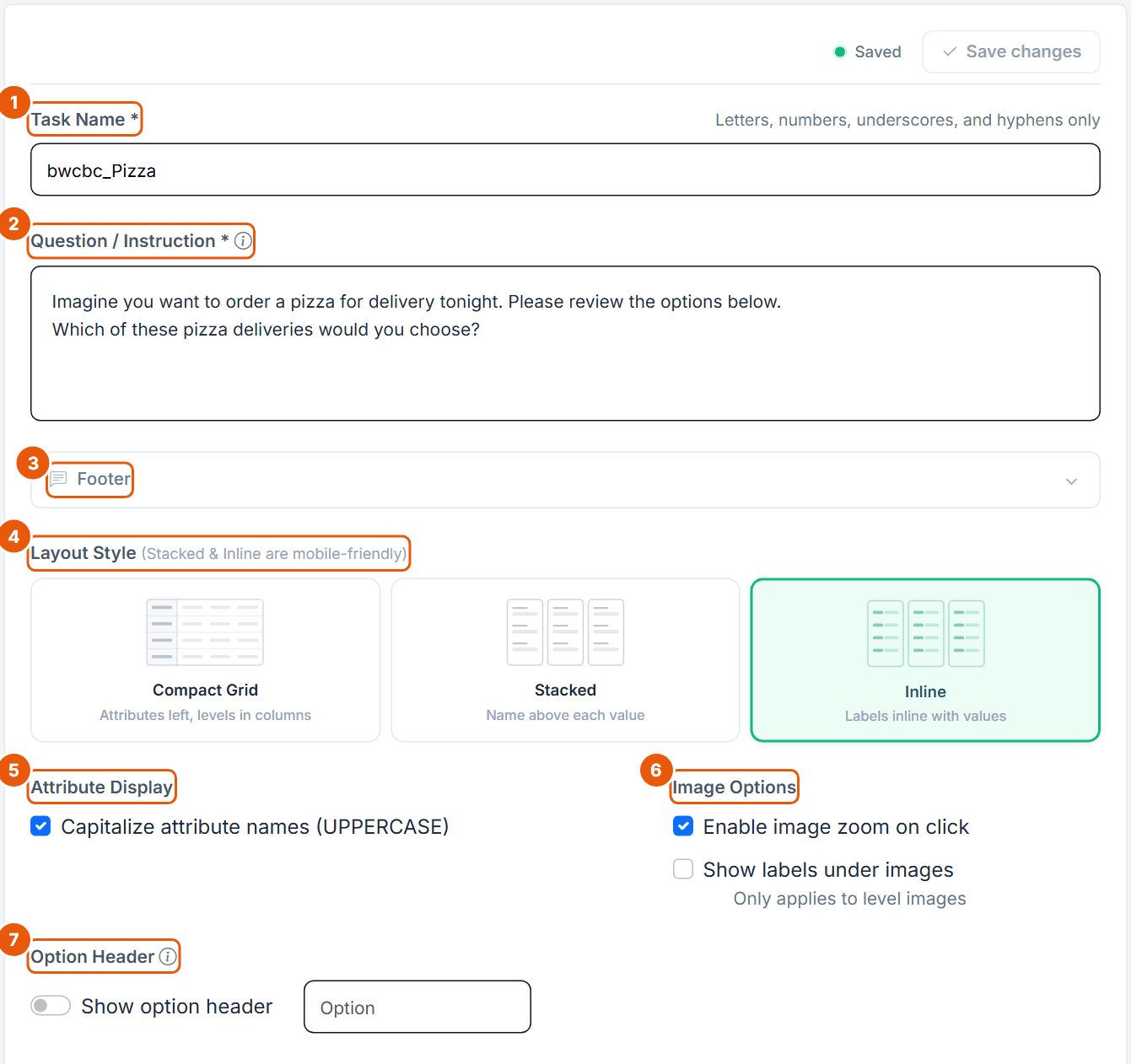
Figure 1. The General step of the Pizza BW-CBC task.
No.
Control
What it does
1
Task Name *
Letters, numbers, underscores and hyphens only, up to 50 characters, no spaces. Default bwcbc_task; the Pizza task uses bwcbc_Pizza. It becomes part of the export column names (see the box below).
2
Question / Instruction *
"This text appears above the choice options in each task". Default: "Please select your BEST and WORST choice from the options below." Up to 10,000 characters and 10 inline images.
3
Footer
Collapsible panel for optional text below the task.
4
Layout Style
Compact Grid (attributes left, levels in columns), Stacked (name above each value) or Inline (labels inline with values). Default Inline. Stacked and Inline are mobile-friendly.
5
Attribute Display
Capitalize attribute names (UPPERCASE), off by default (on in the Pizza task).
6
Image Options
Enable image zoom on click and Show labels under images (only applies to level images). Both off by default.
7
Option Header
Show option header (on by default) and the label (default "Option"); the text field is disabled while the switch is off. The Pizza task has it off. The label is also used for the product in Block 2 ("Option 2").
Export column names
In the wide data export a BW-CBC task has the columns bwcbc_<Task Name>_t1_best and bwcbc_<Task Name>_t1_worst per task (the value is the option number, 1 = Option 1), plus bwcbc_<Task Name>_t1_none when the follow-up was answered (1 = Yes, 2 = No). Tasks at a fixed-task position read FIXED_t<n>, for example bwcbc_<Task Name>_FIXED_t3_best. The prefix is always lowercase bwcbc_ and the task number has a t in front. Because the prefix is added automatically, the Pizza task name bwcbc_Pizza gives bwcbc_bwcbc_Pizza_t1_best; the task name Pizza would give bwcbc_Pizza_t1_best.
Attributes
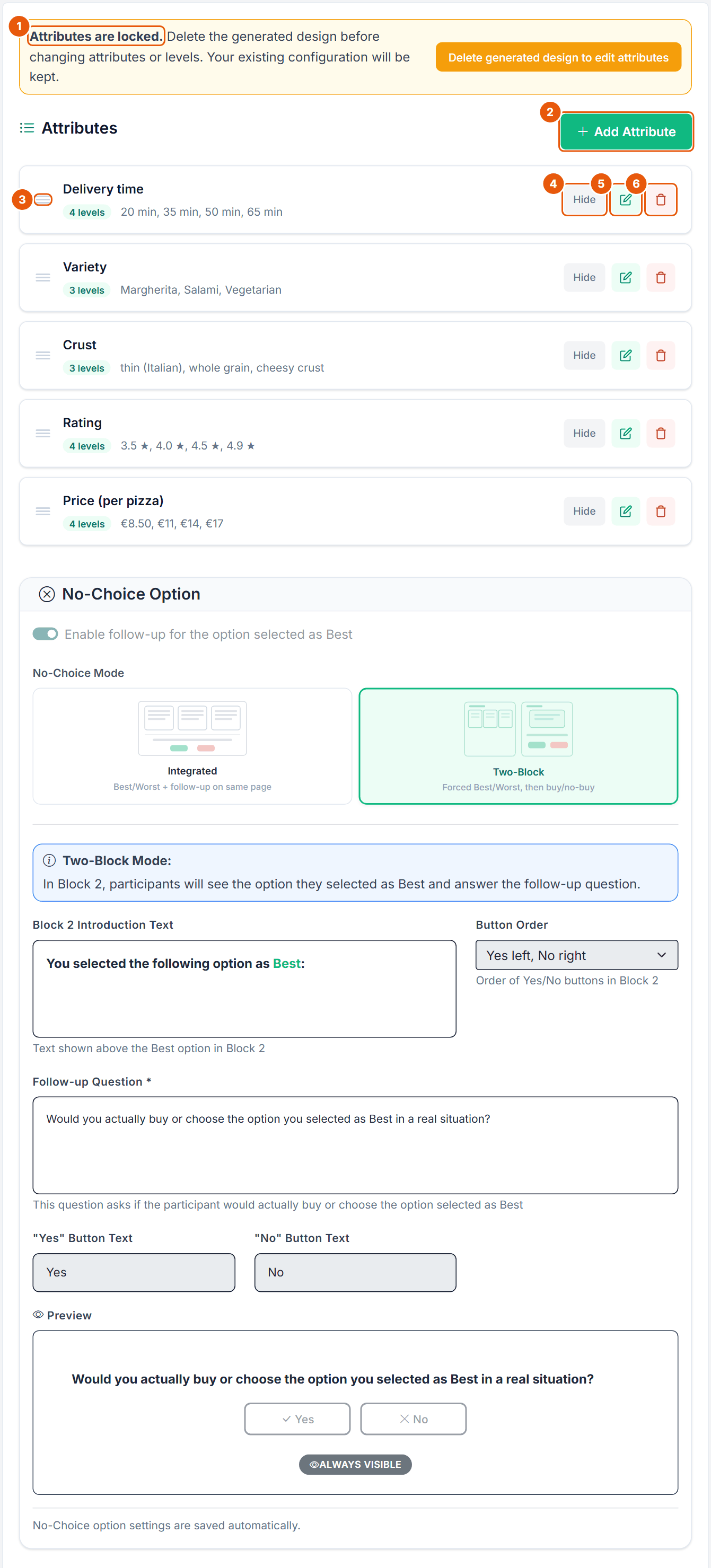
Figure 2. The Attributes step of the Pizza task. A design exists, so the attributes are locked. The No-Choice Option card (Figure 4) sits below the attributes.
No.
Control
What it does
1
Attributes are locked.
Shown once a design exists. Delete generated design to edit attributes removes the design and keeps all settings.
2
Add Attribute
Opens the Add Attribute dialog (Figure 3).
3
Drag handle
"Drag to reorder". The order here is the order of the rows on the cards.
4
Hide / Show
"Hidden attributes are still part of the design but won't be displayed in the survey."
5
Edit
Opens the attribute for editing. Here name and levels accept inline formatting (no images). With a design present a change shows "Design exists but attributes have changed. Please regenerate your design."
6
Delete
Deletes the attribute after confirmation.
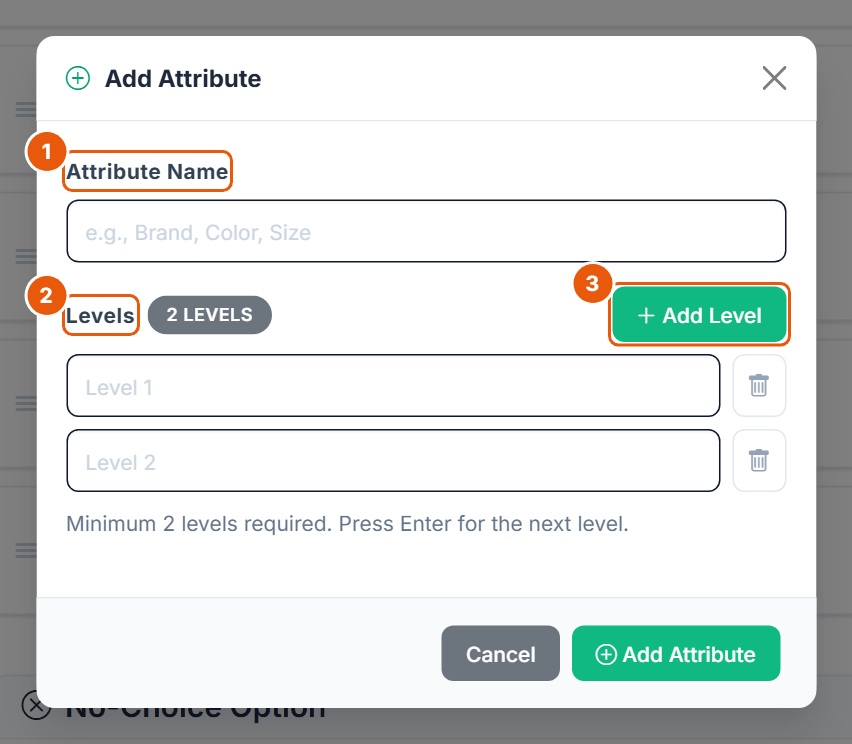
Figure 3. The Add Attribute dialog.
No.
Control
What it does
1
Attribute Name
Plain text, up to 50 characters. Two attributes cannot share a name (ignoring capitalization).
2
Levels
Plain text fields, up to 50 characters each. "Minimum 2 levels required. Press Enter for the next level." Duplicate levels (ignoring capitalization) are not allowed.
3
Add Level
Adds a level field, up to 20 levels ("An attribute can have at most 20 levels."). Pictures are assigned on the Level Images step, not here.
Reserved names: attributes only, never levels
Level names are never reserved. "None" is a valid level. Only attribute names that equal a technical column of Choicery's data files are rejected, for example NoneOpt, ASC_none, best, worst or none_response, with the message: Attribute name "<x>" is a technical column name in Choicery data files. Please choose another name.
Limit
Editor (all plans)
Free
Attributes per task
up to 20
4
Levels per attribute
2 to 20
4
Attribute and level name length
50 characters
50 characters
The literature recommends far fewer; see Section 7.
No-Choice Option (in the Attributes step)
BW-CBC has no "None of these" card in the set. The No-Choice Option is a follow-up on the option selected as Best: would the respondent actually buy or choose it? The card saves automatically. Leave it off for a pure best-worst product choice.
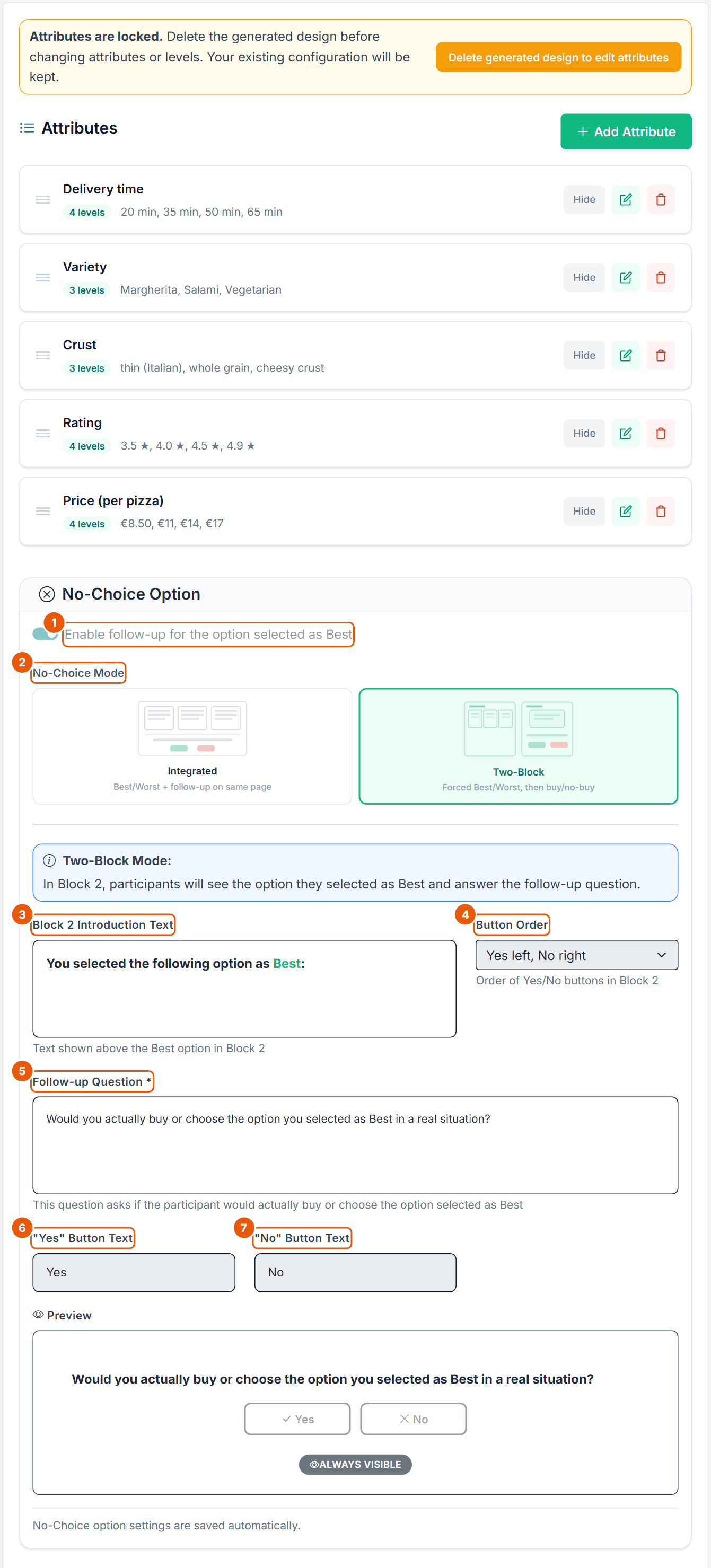
Figure 4. The No-Choice Option card of the Pizza task, set to Two-Block. Responses exist, so the structural fields are locked.
No.
Control
What it does
1
Enable follow-up for the option selected as Best
Switch, off by default. Switching it on shows the rest of the card.
2
No-Choice Mode
Integrated ("Best/Worst + follow-up on same page", default) or Two-Block ("Forced Best/Worst, then buy/no-buy"). Two-Block note: "In Block 2, participants will see the option they selected as Best and answer the follow-up question."
3
Block 2 Introduction Text
Two-Block only. "Text shown above the Best option in Block 2". Default "You selected the following option as Best:".
4
Button Order
Two-Block only. "Order of Yes/No buttons in Block 2": Yes left, No right (default) or No left, Yes right. Same stored setting as the Integrated Button Order.
5
Follow-up Question *
"This question asks if the participant would actually buy or choose the option selected as Best". Default "Would you actually buy or choose the option you selected as Best in a real situation?". An empty text falls back to the default.
6
"Yes" Button Text
Required, up to 50 characters. Default "Yes".
7
"No" Button Text
Required, up to 50 characters. Default "No".
Below the button texts a Preview shows the follow-up with the current wording and a badge for the visibility; you can click Yes or No to see the selected state.
Advanced Settings (Integrated mode only)
Setting
Options and default
Effect
Question Visibility
Always visible (default) or Show after Best/Worst selection
With the default, the follow-up is on screen from the start. With the second option it appears only after Best and Worst are both chosen.
Button Order
Yes left, No right (default) or No left, Yes right
Shared with the Two-Block Button Order.
Button Style
Colored (Green / Red) or Neutral (Black border) (default)
Visual style of the Yes/No buttons.
Green/red border when selected
Switch, Neutral only. On for new tasks, off for tasks saved before the setting existed
"Off: the selected button uses the primary color."
Question Position
Below choice set (default) or Modal after selection
"Where the integrated follow-up appears": under the cards, or in a dialog that opens once Best and Worst are chosen.
Show icons on buttons
Switch, on by default
Check mark and cross before Yes/No.
Expected None Share (Optional)
Empty, or 0 to 1 in steps of 0.01 (the server also accepts a percentage from 0 to 100)
"Proxy metadata for design diagnostics; this does not change the generated tasks." Out of range: "Expected none share must be between 0 and 1 (or 0 and 100%)."
Hidden in Two-Block mode, but still used
In Two-Block mode only Block 2 Introduction Text and Button Order are shown. Button Style, Green/red border when selected and Show icons on buttons are hidden, but the Block 2 pages still use their saved values. To change them, switch to Integrated, change them, and switch back.
Lock once responses exist
"Mode, visibility, question position and button order are locked because responses already exist. Question text and button labels remain editable." The on/off switch is locked too. Changing a locked field is refused with "Cannot change BW-CBC none-option structure because N active and M trashed response(s) already exist for this task. ..."
Integrated or Two-Block?
Integrated
Two-Block
Pages per task
1
2
Flow
Best, Worst and the follow-up on one page (below the set, or in a dialog)
Block 1: all best-worst tasks without follow-up. Block 2: one page per task in the same order with the introduction text, the option selected as Best ("Option n" when the option header is on), the follow-up and Yes/No.
Page count
One page per task
Doubles: the Pizza design (10 random + 2 fixed tasks) has 24 pages instead of 12.
No study in the sources behind this guide tests a follow-up after a best-worst choice. The evidence on dual response comes from first-choice CBC; see the DR-CBC guide (Hung et al., 2025; Orme & Chrzan, 2017, ch. 5).
Best-Worst
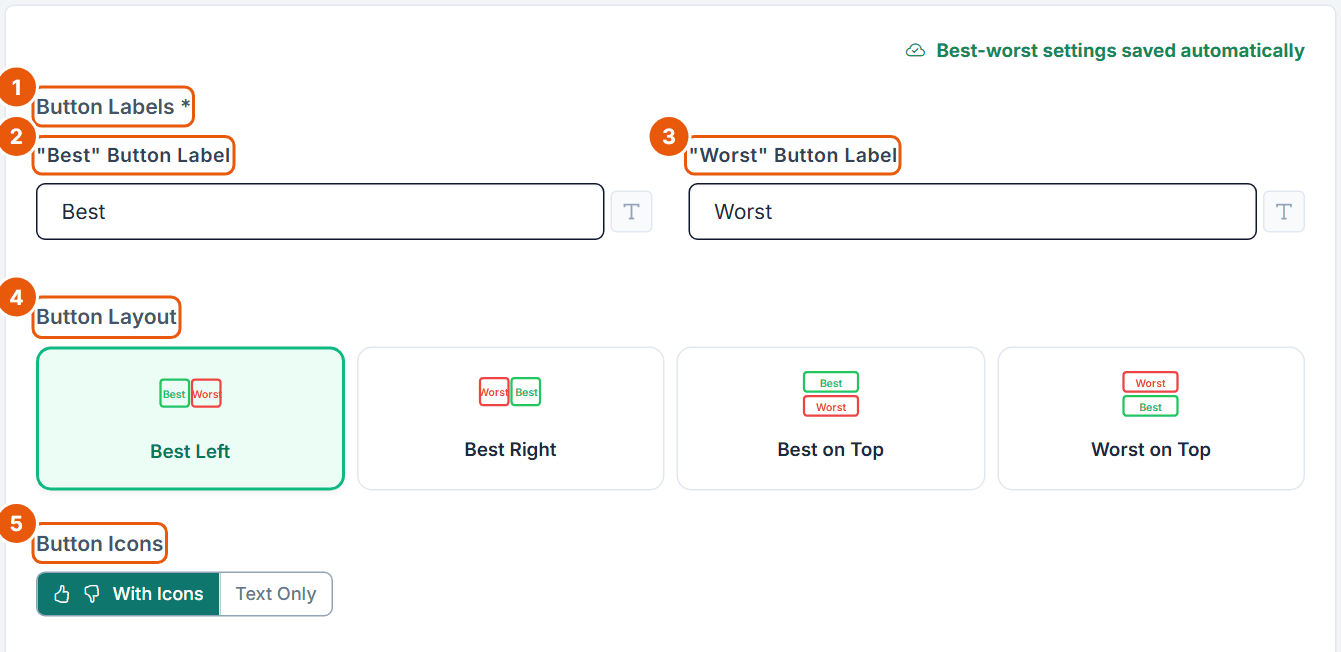
The Best-Worst step controls the two buttons on every card. It saves automatically.
Figure 5. The Best-Worst step of the Pizza task.
No.
Control
What it does
1
Button Labels *
The words on the two buttons of every card. They are also inserted into the respondent messages (see Section 8).
2
"Best" Button Label
Default "Best". Inline formatting via the T button. An empty label falls back to "Best". Example wording: "Most preferred".
3
"Worst" Button Label
Default "Worst", falls back to "Worst" when empty.
4
Button Layout
Best Left (default), Best Right, Best on Top or Worst on Top: the order of the two buttons on each card.
5
Button Icons
With Icons (thumbs up and down, default) or Text Only.
This step has no live preview; use the Preview step. One concept can never be both Best and Worst: marking it for the other role moves the mark.
5. The Optional Steps
Fixed Tasks
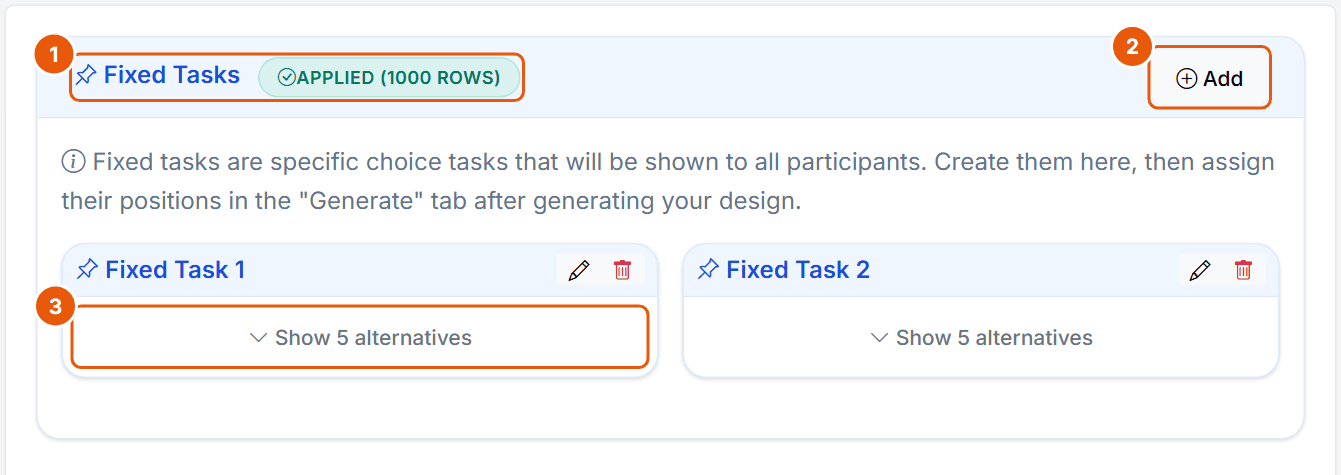
Fixed tasks are the same for every respondent. They are excluded from the HB estimation and serve as holdouts to check predictions.
Figure 6. The Fixed Tasks step of the Pizza task with two fixed tasks of 5 alternatives each.
No.
Control
What it does
1
Fixed Tasks + state badge
Shows whether the fixed tasks are in the design ("APPLIED (1000 ROWS)"). Without fixed tasks a warning says that you cannot calculate hit rates.
2
Add
Opens the Create Fixed Task dialog (Figure 7). Disabled without attributes.
3
Show n alternatives
Expands the alternatives. The pencil and bin icons edit or delete the fixed task.
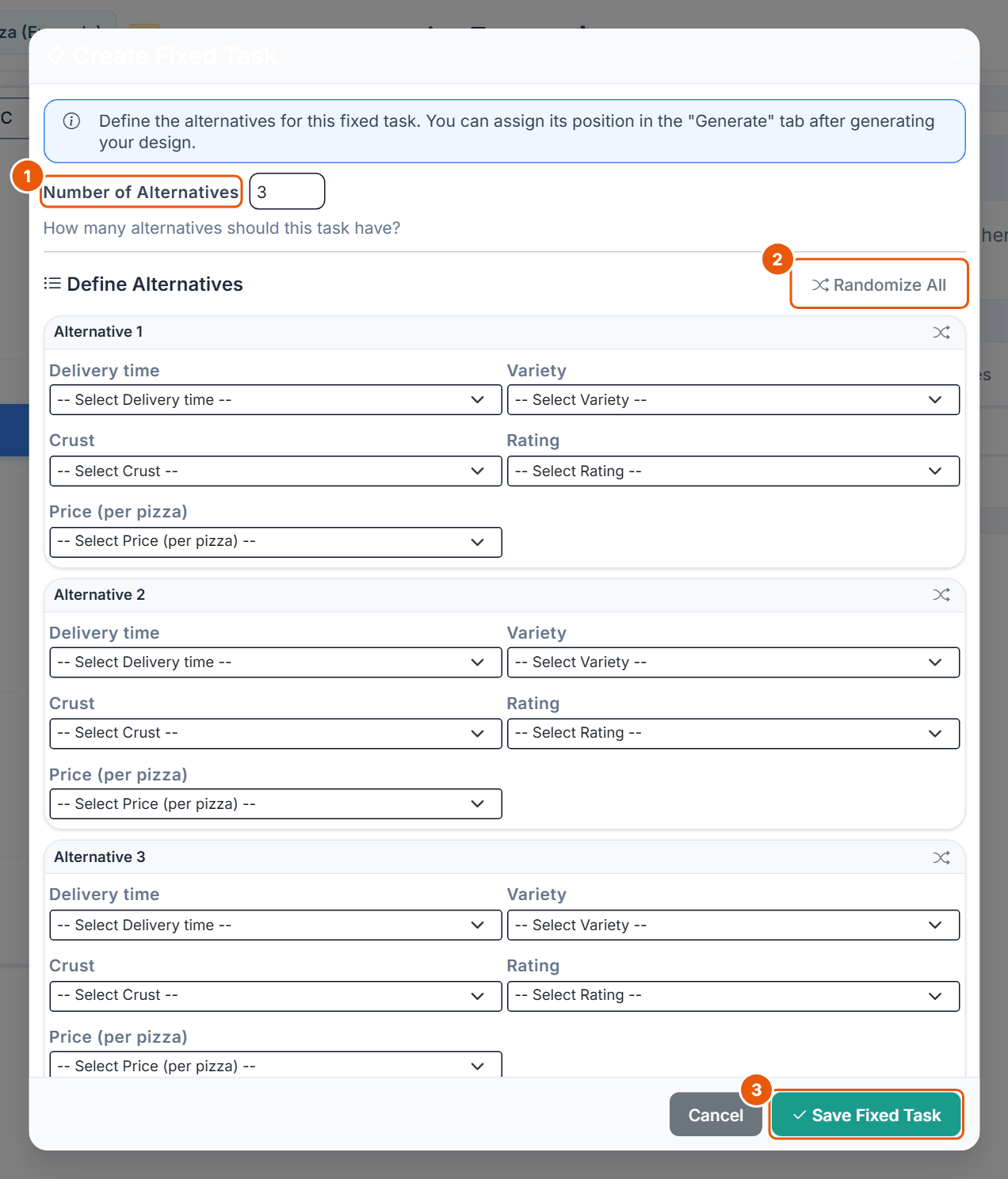
Figure 7. The Create Fixed Task dialog.
No.
Control
What it does
1
Number of Alternatives
3 to 9; starts at the current concept count. A different count is allowed: "This fixed task has N alternatives while generated tasks use M. This is allowed; the fixed task will be shown exactly as defined."
2
Randomize All
Fills all selects at random; the shuffle icon per alternative randomizes one.
3
Save Fixed Task
Every level must be chosen, and alternatives that violate a prohibition are rejected. Up to 20 fixed tasks.
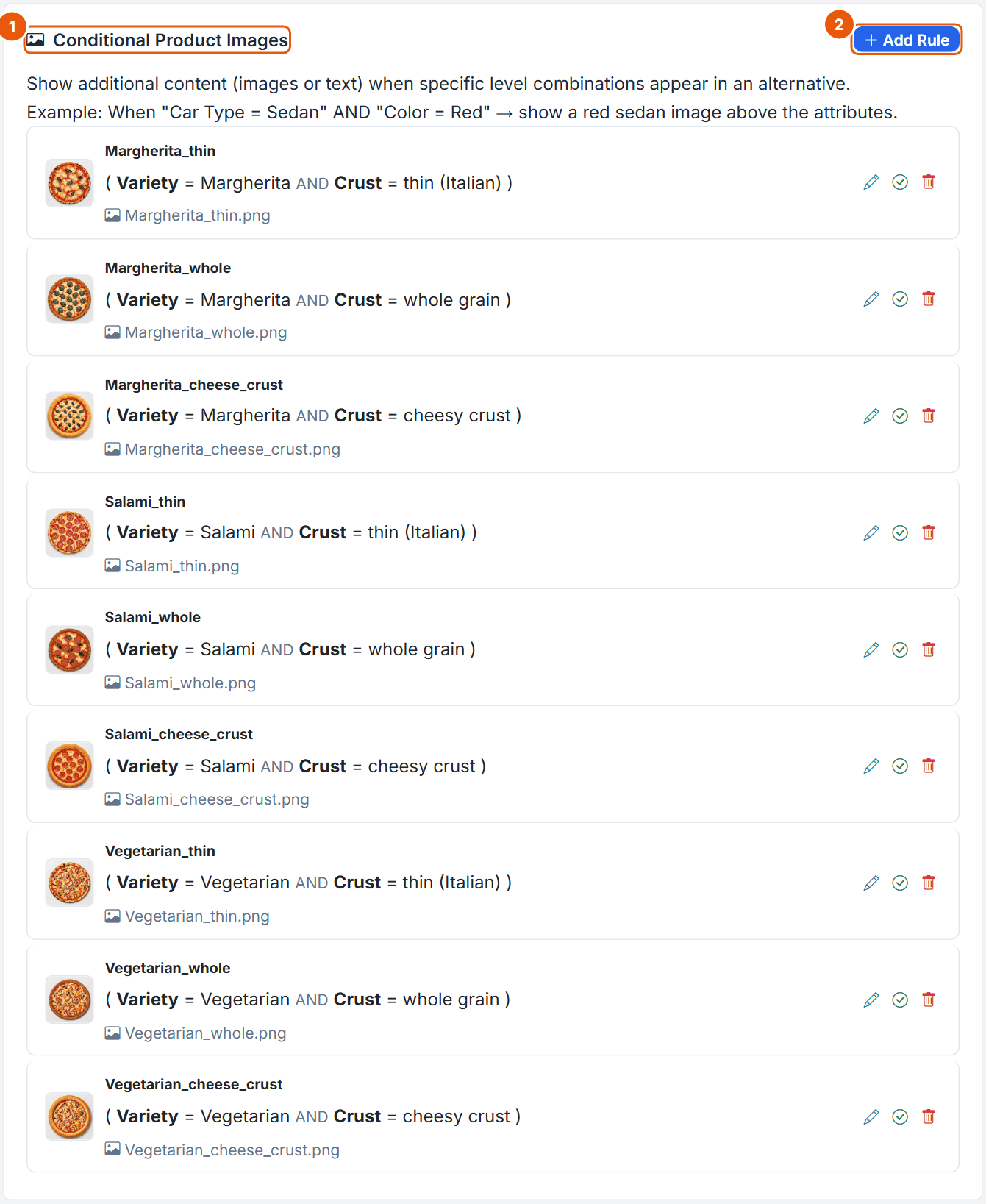
Product Images
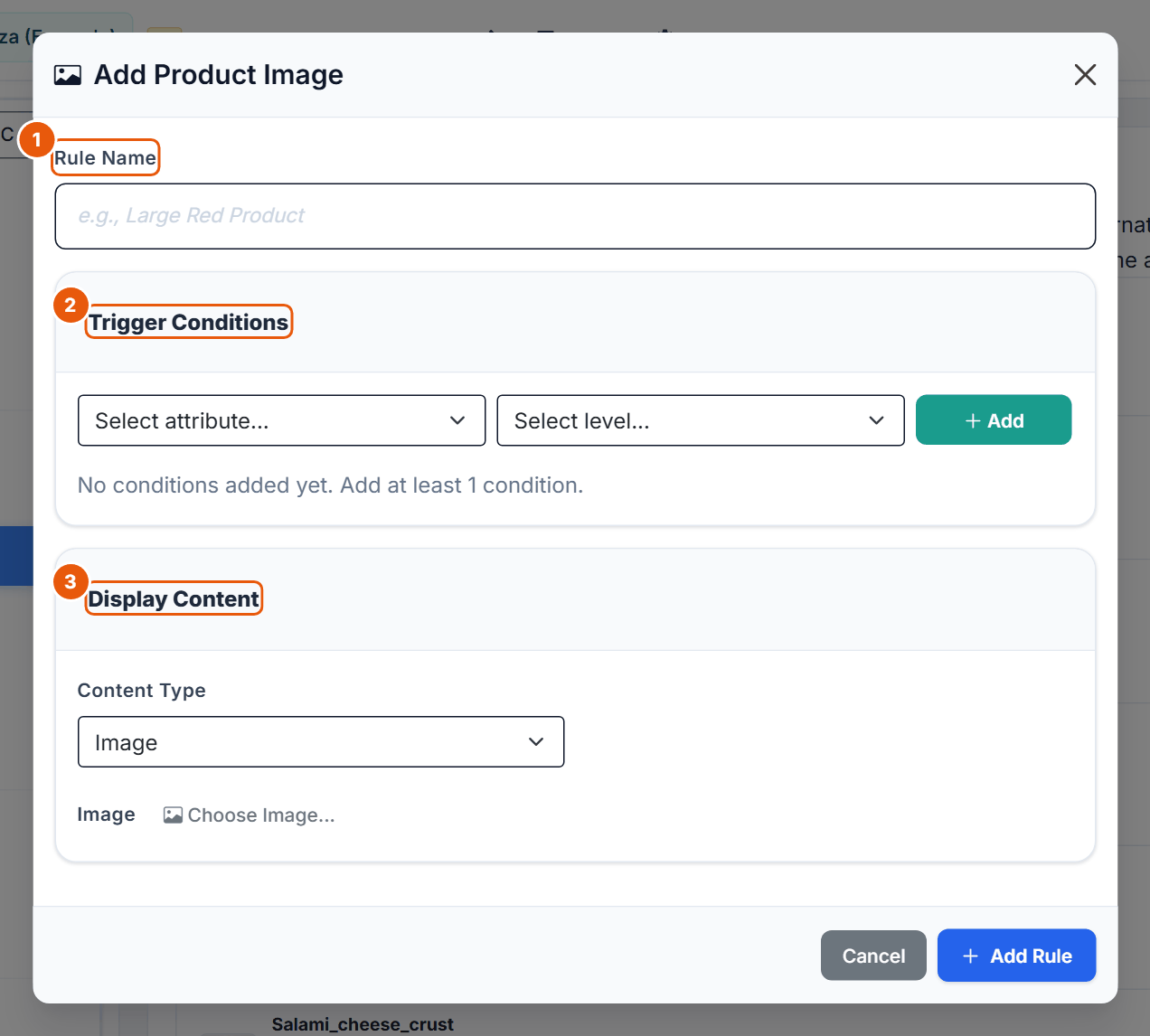
Figure 8. The Product Images step of the Pizza task: one rule per Variety and Crust combination.
No.
Control
What it does
1
Conditional Product Images
"Show additional content (images or text) when specific level combinations appear in an alternative." The icons per rule edit it, switch it on or off, and delete it.
2
Add Rule
Opens the Add Product Image dialog (Figure 9). Up to 30 rules.
Figure 9. The Add Product Image dialog.
No.
Control
What it does
1
Rule Name
Required, up to 80 characters.
2
Trigger Conditions
Attribute and level, then + Add; AND and OR groups; an attribute only once per AND group; at least one condition.
3
Display Content
Content Type Image (Choose Image...) or Text (up to 1,000 characters). The content appears at the top of the card. Unlike DR-CBC there is no Max Height Ratio field.
Level Images
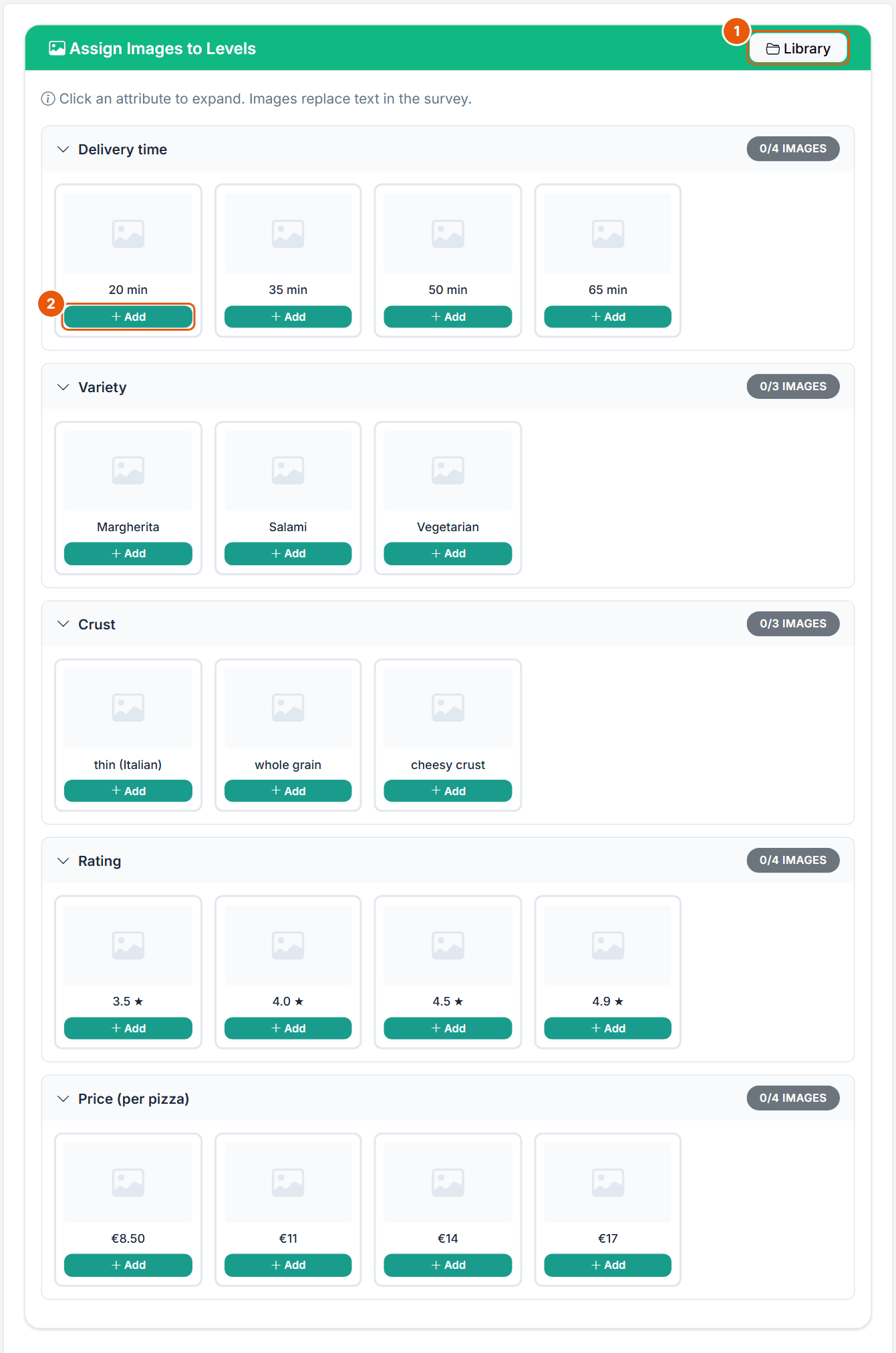
Figure 10. The Level Images step of the Pizza task (no level images used).
No.
Control
What it does
1
Library
Opens the image library of the project.
2
Add
Uploads or picks an image for this level (png, jpg, jpeg, gif, webp). "Images replace text in the survey." Once an attribute has an image, a switch to hide the attribute name lets the images use the full card width.
Prohibitions
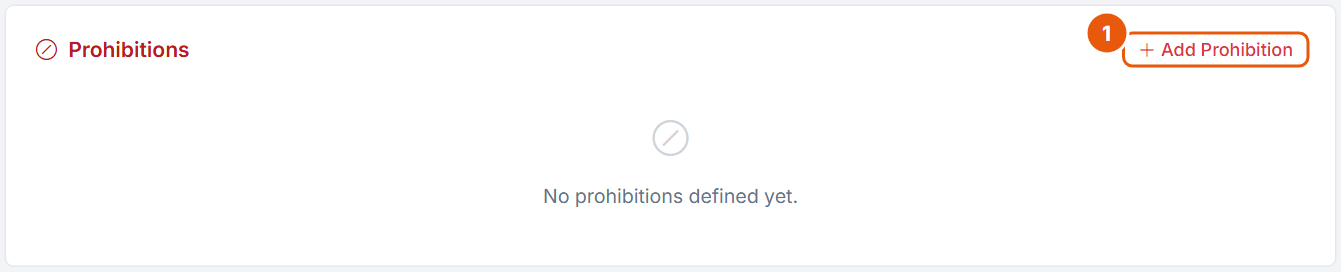
Figure 11. The Prohibitions step (the Pizza task has none).
No.
Control
What it does
1
Add Prohibition
Opens the dialog in Figure 12. Disabled without attributes or while a design exists. Up to 50.
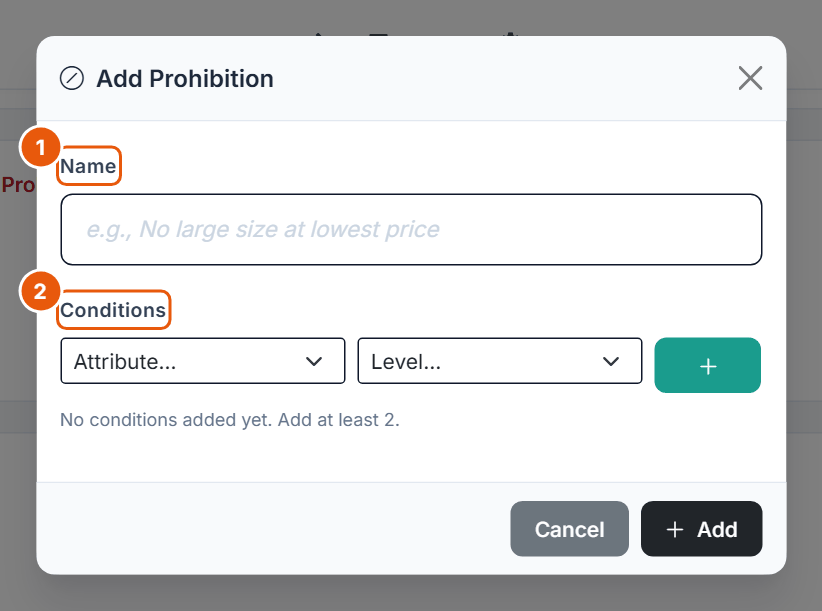
Figure 12. The Add Prohibition dialog.
No.
Control
What it does
1
Name
A description of the rule.
2
Conditions
Attribute and level, then +. At least 2 conditions.
Templates
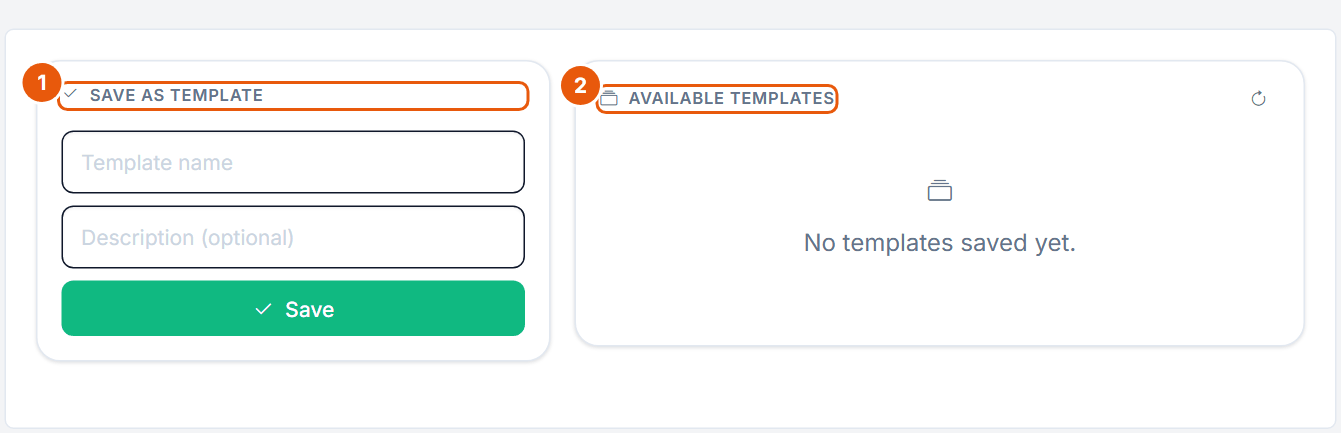
Figure 13. The Templates step.
No.
Control
What it does
1
Save as Template
Template name and optional description, then Save. A template stores the whole task setup: general settings, best-worst and follow-up settings, attributes, fixed tasks, hidden attributes and the image mapping. Disabled until attributes exist.
2
Available Templates
Your saved templates, with a refresh button.
6. Generate, Diagnostics and Preview
Generate
BW-CBC uses the same design generator as CBC. The design covers the product profiles; best and worst are two answers to the same set.
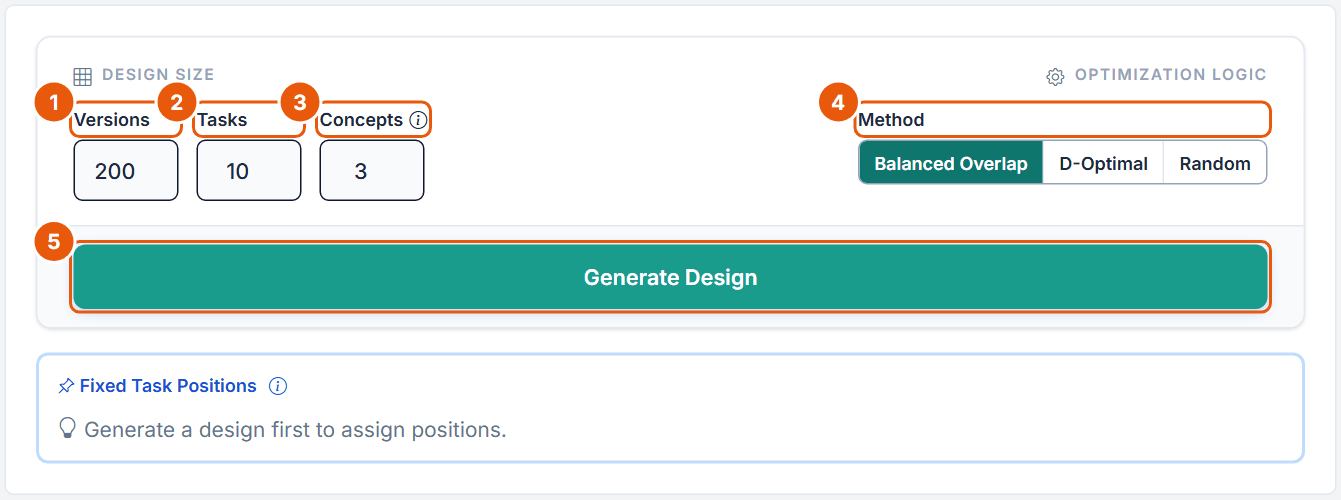
Figure 14. The Generate step before a design exists, with the default values.
No.
Control
What it does
1
Versions
Number of questionnaire versions; each respondent gets one. Default 200, allowed 1 to 1,000.
2
Tasks
Number of random tasks per respondent; fixed tasks are added on top. Default 10, allowed 1 to 30. Free plan: at most 6 per block, fixed tasks included.
3
Concepts
"Number of alternatives or concepts shown in the task." Default 3, allowed 3 to 9. The Free plan allows at most 3, so a Free BW-CBC always shows exactly 3 concepts.
4
Method
Balanced Overlap (default, "Balanced-overlap heuristic with level and pair balancing"), D-Optimal ("D-efficient heuristic design", slower) or Random (no optimization). The overlap target is fixed internally.
5
Generate Design
Starts the generation with a progress bar and Cancel. Runs stop after 300 seconds. An existing design needs confirmation ("Replace existing design? ..."). Generation is blocked once responses exist.
The editor warns when levels must repeat within a task ("Repeated levels are unavoidable with N alternatives for ...") and checks the ranges ("Number of concepts must be between 3 and 9").
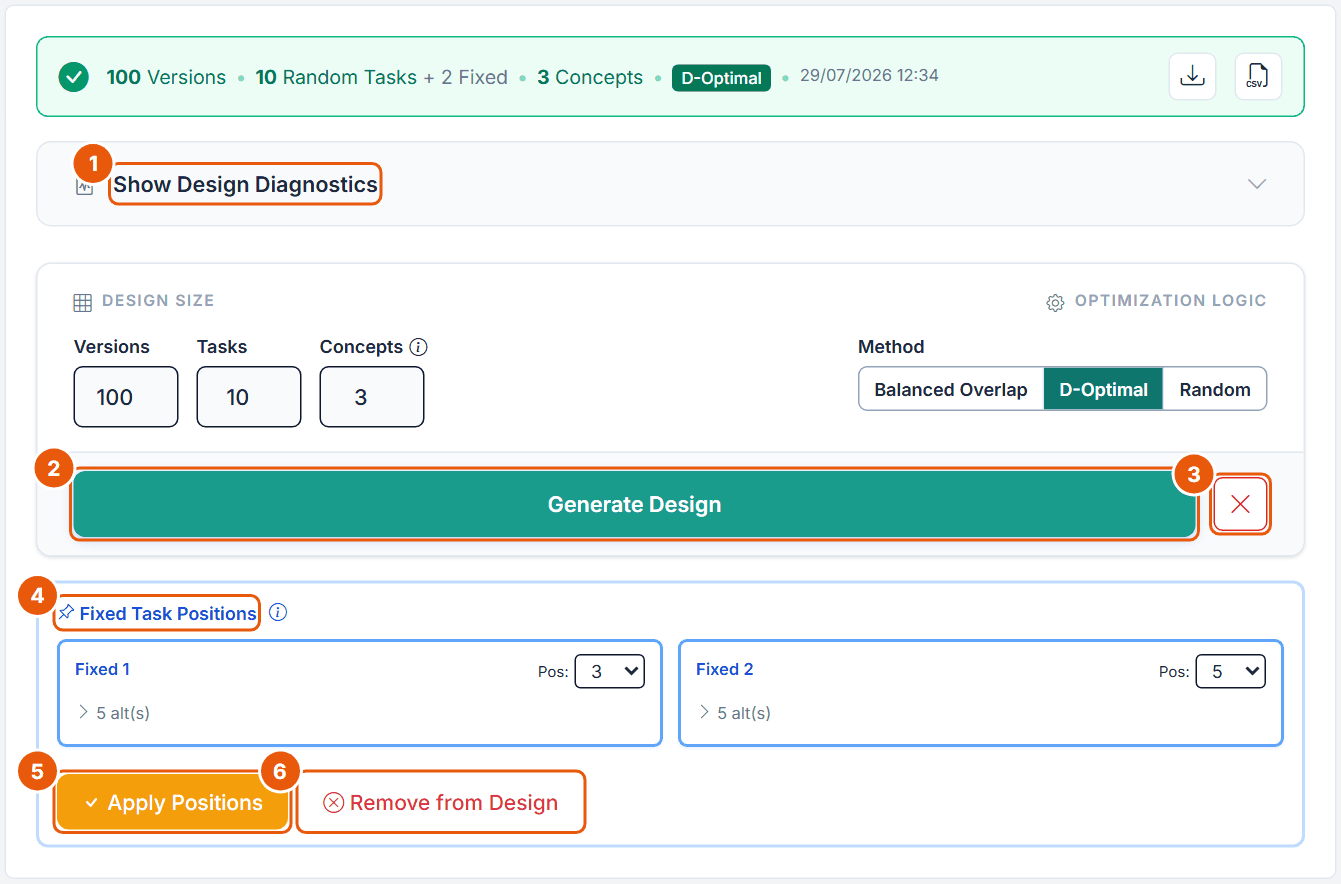
Figure 15. The Generate step of the Pizza task after generation: 100 versions, 10 random tasks + 2 fixed, 3 concepts, D-Optimal.
No.
Control
What it does
1
Show Design Diagnostics
Opens the diagnostics (Figure 16). The status bar above offers Download Report and Download Design CSV.
2
Generate Design
Replaces the design after confirmation.
3
× (Delete design)
Deletes the design. Disabled once responses exist: "Design locked: responses already collected. Delete all responses to unlock."
4
Fixed Task Positions
"Position 1 = first task shown, Position 2 = after first random task, etc." Here positions 3 and 5 of 12.
5
Apply Positions
Inserts the fixed tasks. Positions must be unique.
6
Remove from Design
Takes the fixed tasks out of the design (their definitions stay).
Design Diagnostics
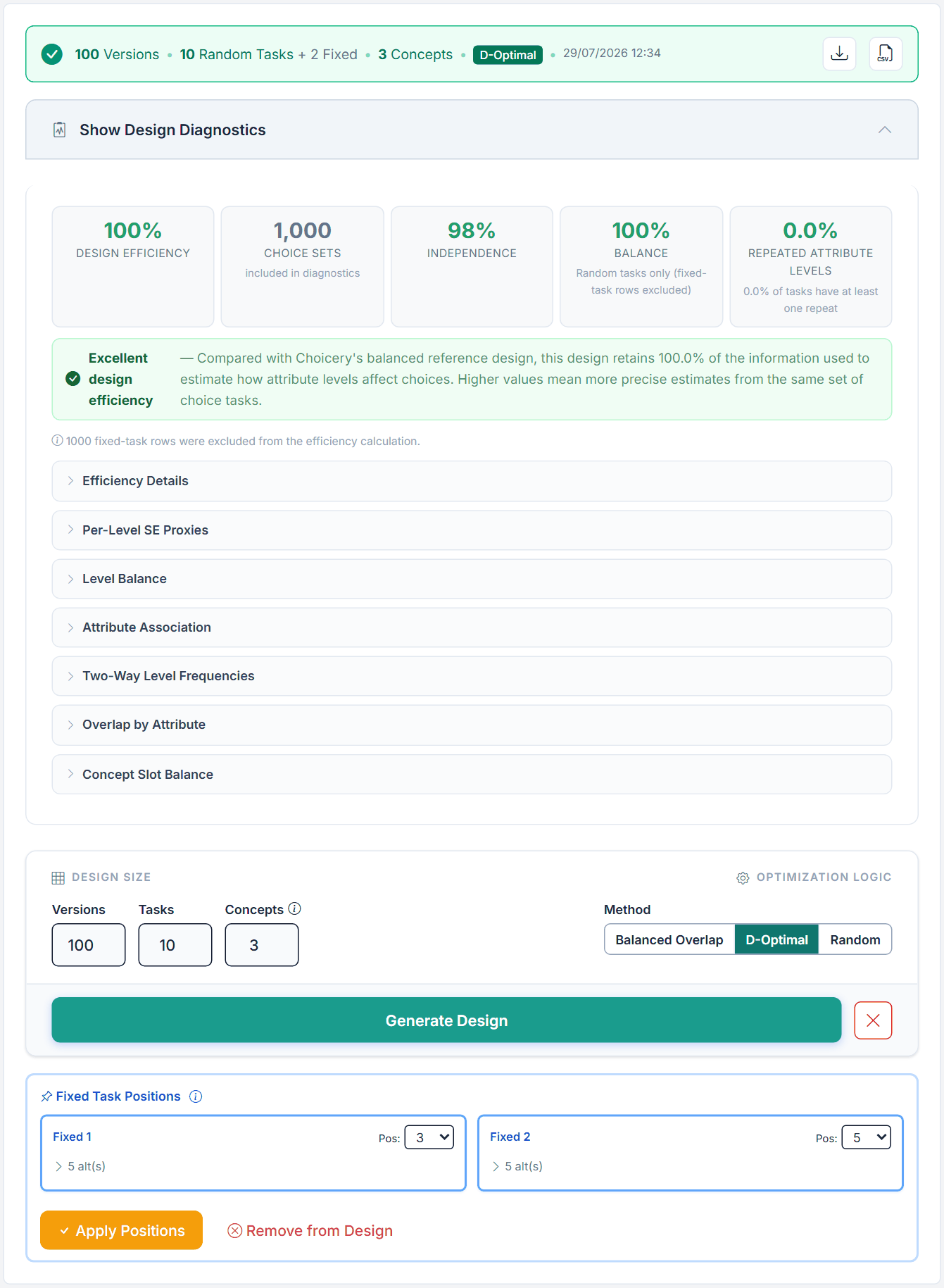
Figure 16. The design diagnostics of the Pizza BW-CBC task.
Element
Pizza value
What it means and what to do
Design Efficiency
100%
Information kept compared with Choicery's balanced reference design ("Excellent design efficiency"). A low value: reduce prohibitions or try another method.
Choice Sets
1,000
Random sets included (100 versions x 10 tasks). The note below reports the excluded fixed-task rows (1,000).
Independence
98%
How uncorrelated the attributes are. Low values usually come from prohibitions.
Balance
100%
How evenly the levels appear (random tasks only).
Repeated Attribute Levels
0.0%
Share of level repeats within tasks. D-Optimal avoids repeats here; Balanced Overlap allows some on purpose.
Detail sections
Efficiency Details (D-efficiency, A-efficiency ratio, parameters, condition number; with an Expected None Share also the proxy none rows), Per-Level SE Proxies (target 0.05 or lower), Level Balance, Attribute Association, Two-Way Level Frequencies, Overlap by Attribute, Concept Slot Balance.
The panel has no sample-size section; use Section 7. The efficiency figures describe the product profiles; the best-worst likelihood is handled later in estimation, so they are a proxy.
Preview
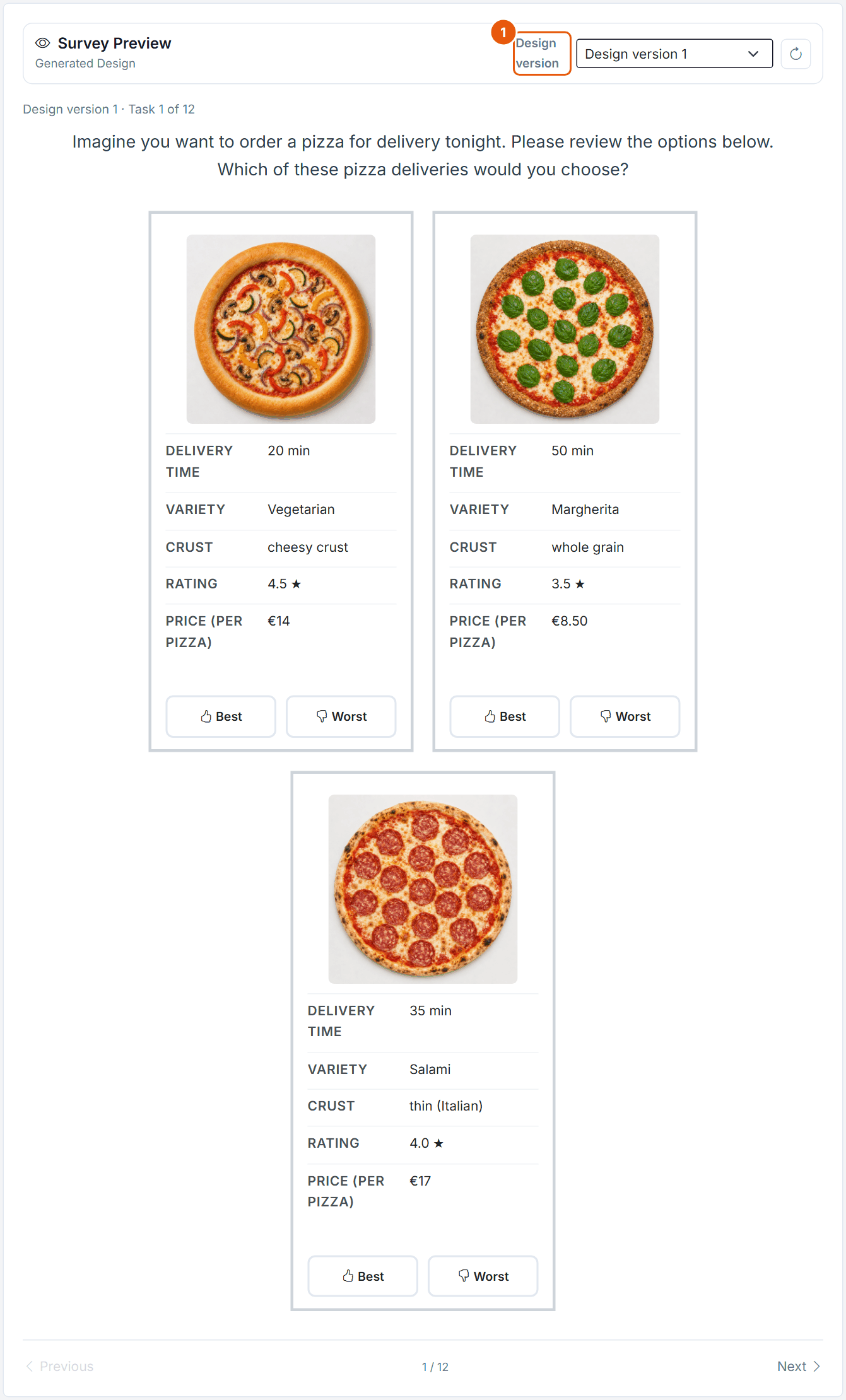
Figure 17. The Survey Preview of the generated Pizza design: Design version 1, Task 1 of 12.
No.
Control
What it does
1
Design version
Chooses the version to page through with Previous and Next; the button next to it reloads the preview.
The Survey Preview shows the tasks of a chosen Design version ("Generated Design"), or sample rows ("Example Preview") before a design exists. Page through with Previous and Next; the reload button refreshes it. The Preview shows the cards with their Best and Worst buttons but not the No-Choice follow-up and not the Block 2 pages. Use a survey test run to check the follow-up.
7. How Large Should Your Study Be?
The design rules are those of CBC. The sources give no separate size rules for best-worst CBC, so the CBC values below apply, and the sample-size rule is applied to the best choices only (a conservative reading, since the worst choices add information).
Topic
Recommendation
Source
Choicery limit
Attributes
About 6 to 8 at most. Sources disagree: Orme (in Rao, 2026) recommends CBC for 4 or fewer, Orme and Chrzan (2017) only worry from 15 on. Two judgements per task make dense profiles harder, so stay at the lower end.
Orme 2020, ch. 6.1, p. 50; Rao 2026, p. 527; Orme & Chrzan 2017, ch. 7
20 (Free plan 4)
Levels per attribute
2 to 5, balanced across attributes (number-of-levels effect). About 5 for price.
Orme 2020, ch. 6.2, pp. 52-53; Rao 2026, pp. 74-75
2 to 20 (Free plan 4)
Tasks
8 to 12; above about 15 HB prediction no longer improves. Whether best-worst allows fewer tasks is open: it "isn't clear" whether a few more best-only tasks would do as well.
Orme 2020, p. 109; Goeken et al. 2024, p. 150; Orme & Chrzan 2017, ch. 18
1 to 30 (Free plan 6 incl. fixed)
Concepts
3 to 5; at least 3 so that the worst choice differs from the best. With 4 or more, respondents in high-involvement categories screen down to about 2.
Orme 2020, pp. 47, 62; Rao 2026, p. 234; Orme & Chrzan 2017, ch. 4
3 to 9 (Free plan 3)
Sample size
n × t × a / c ≥ 500, better 1,000; at least 300 respondents or 200 per reported subgroup.
More than one fixed task; about 7 in-sample holdouts to tell models apart. Older practice: 2 to 4.
Orme 2020, pp. 191-192; Orme & Chrzan 2017, ch. 6; Rao 2026, p. 76
up to 20
Versions
About 10 to 12 good versions capture most of the value.
Orme & Chrzan 2017, ch. 3
1 to 1,000 (default 200)
Prohibitions
Sparingly or not at all.
Orme 2020, ch. 6.3, pp. 53-54
up to 50
None share (follow-up)
About 5 to 20% for a standard None; unstable, rises in later tasks. Remove respondents who never buy.
Orme 2020, p. 111; Orme & Chrzan 2017, ch. 5
Sample size for the Pizza task
t = 10 random tasks, a = 3 concepts, c = 4 (Delivery time, Rating and Price have 4 levels).
n ≥ 500 × 4 / (10 × 3) = 67 (minimum, best choices only)
n ≥ 1,000 × 4 / (10 × 3) = 134 (better)
floor: at least 300 respondents, or 200 per reported subgroup
8. What the Respondent Sees
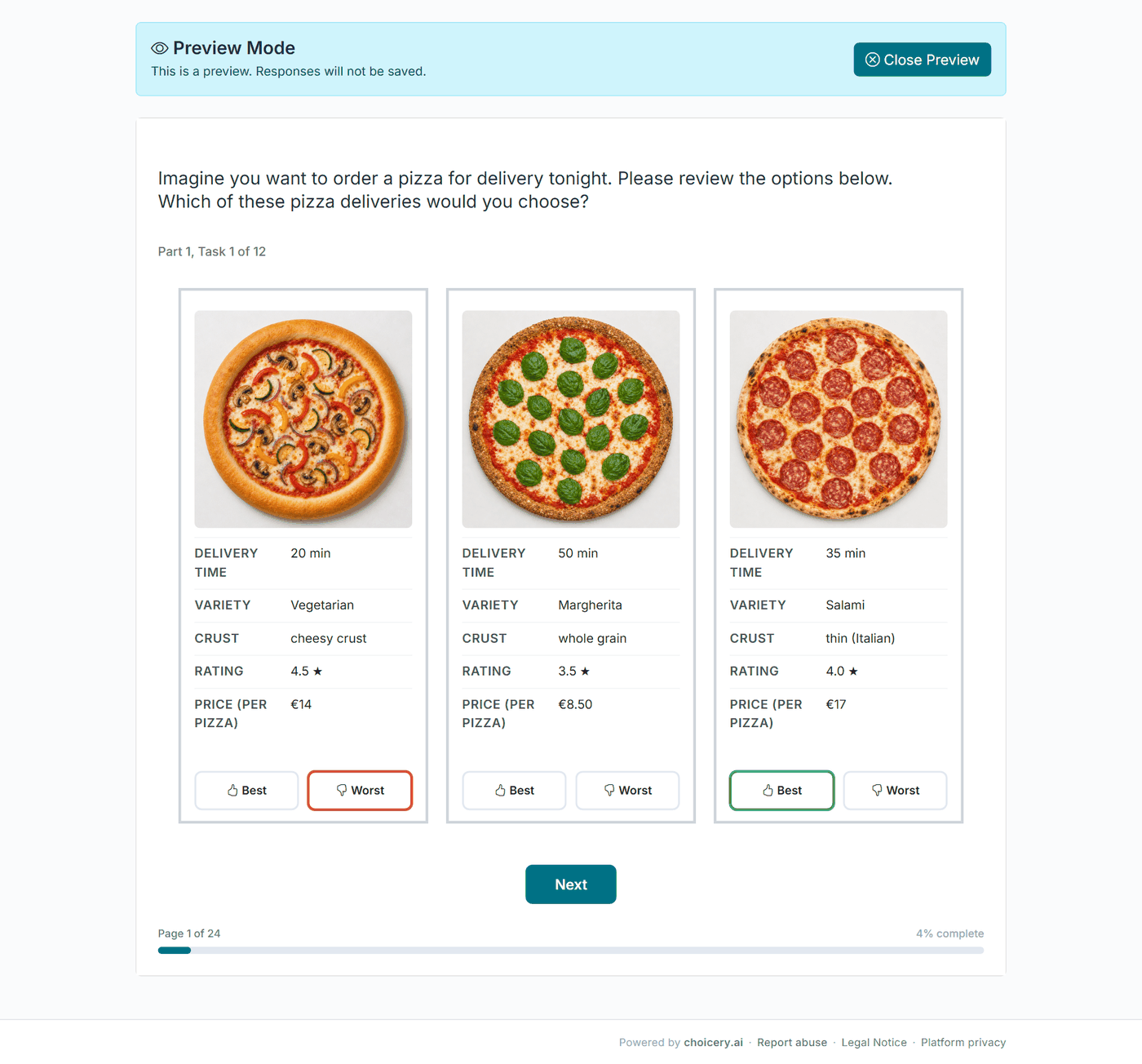
Each card carries its own Best and Worst button, in the chosen layout. The respondent marks one card as Best and a different card as Worst; the chosen buttons get a green and a red border. If something is missing, the page shows messages that contain your button labels, for example 'Please choose one option as "Best" and one option as "Worst".' or 'The same option cannot be chosen as both "Best" and "Worst".' With the follow-up on, "Please answer the question below." is added. The texts can be changed per language in the project settings.
Figure 18. A Pizza best-worst task as the respondent sees it (survey preview, Two-Block flow: "Part 1, Task 1 of 12", page 1 of 24). The third pizza is marked Best (green), the first Worst (red).
In Two-Block mode, Block 1 shows all best-worst tasks without the follow-up. Block 2 then shows, for each task, the introduction text, the option selected as Best, and the follow-up with Yes and No.
9. Estimation and Results
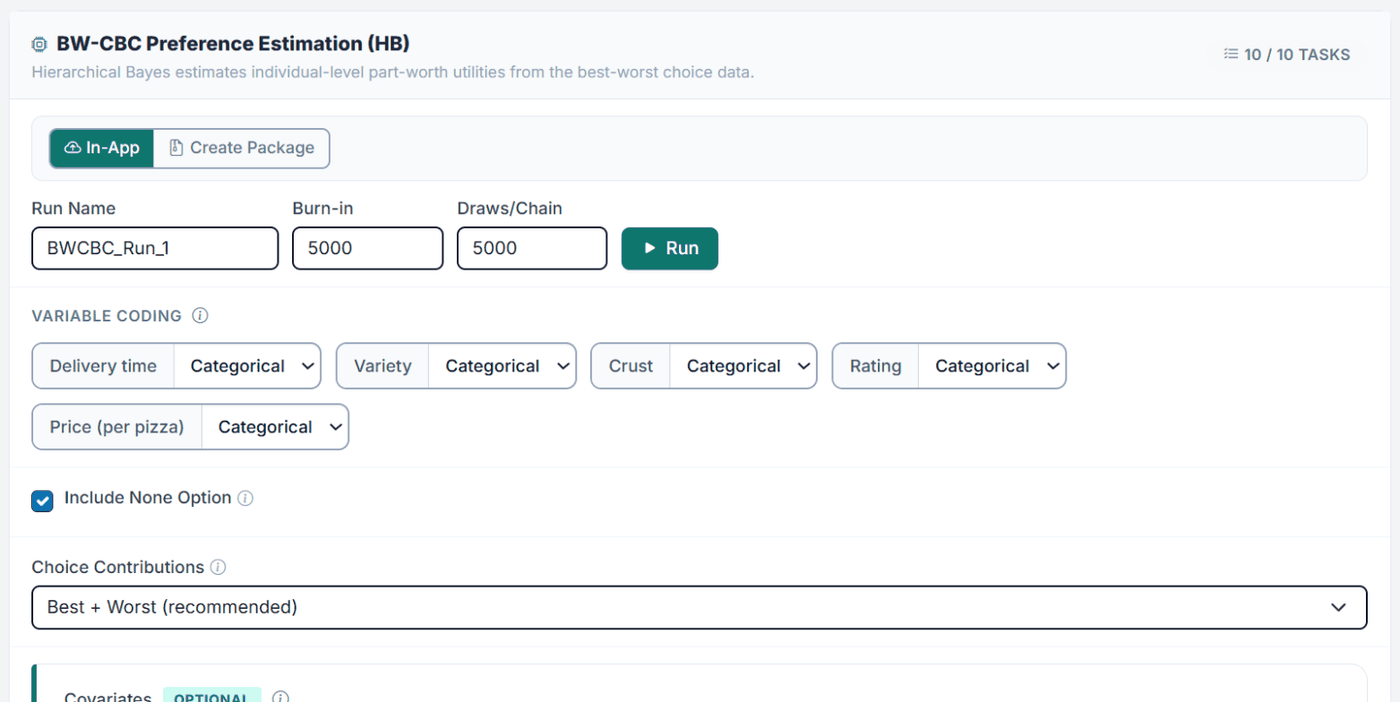
Open the analysis hub, choose the BW-CBC task, and open Preference Analysis (HB). The card is titled BW-CBC Preference Estimation (HB). Run settings, convergence checks and results work as for CBC and are explained in the Preference Analysis (HB) guide. BW-CBC adds two settings.
Figure 19. The BW-CBC Preference Estimation (HB) card of the Pizza study (690 participants, 10 of 10 tasks): Run Name BWCBC_Run_1, the defaults 5,000 / 5,000, Variable Coding, Include None Option ticked and Choice Contributions "Best + Worst (recommended)". The Covariates panel follows below.
Choice Contributions: Best + Worst (recommended) uses both stages; Best only and Worst only exist for diagnostic comparisons, for example to see how much the worst choice adds.
Include None Option (only when the task has the follow-up): "Uses the follow-up after the Best selection in estimation. If a respondent says they would not actually choose the option selected as Best, Choicery treats that task as None / no-choice. Disable it to estimate only the Best/Worst product choices."
Fixed tasks are not used for estimation. RLH is computed over the best and worst observations together; with three concepts the chance level is 0.33.
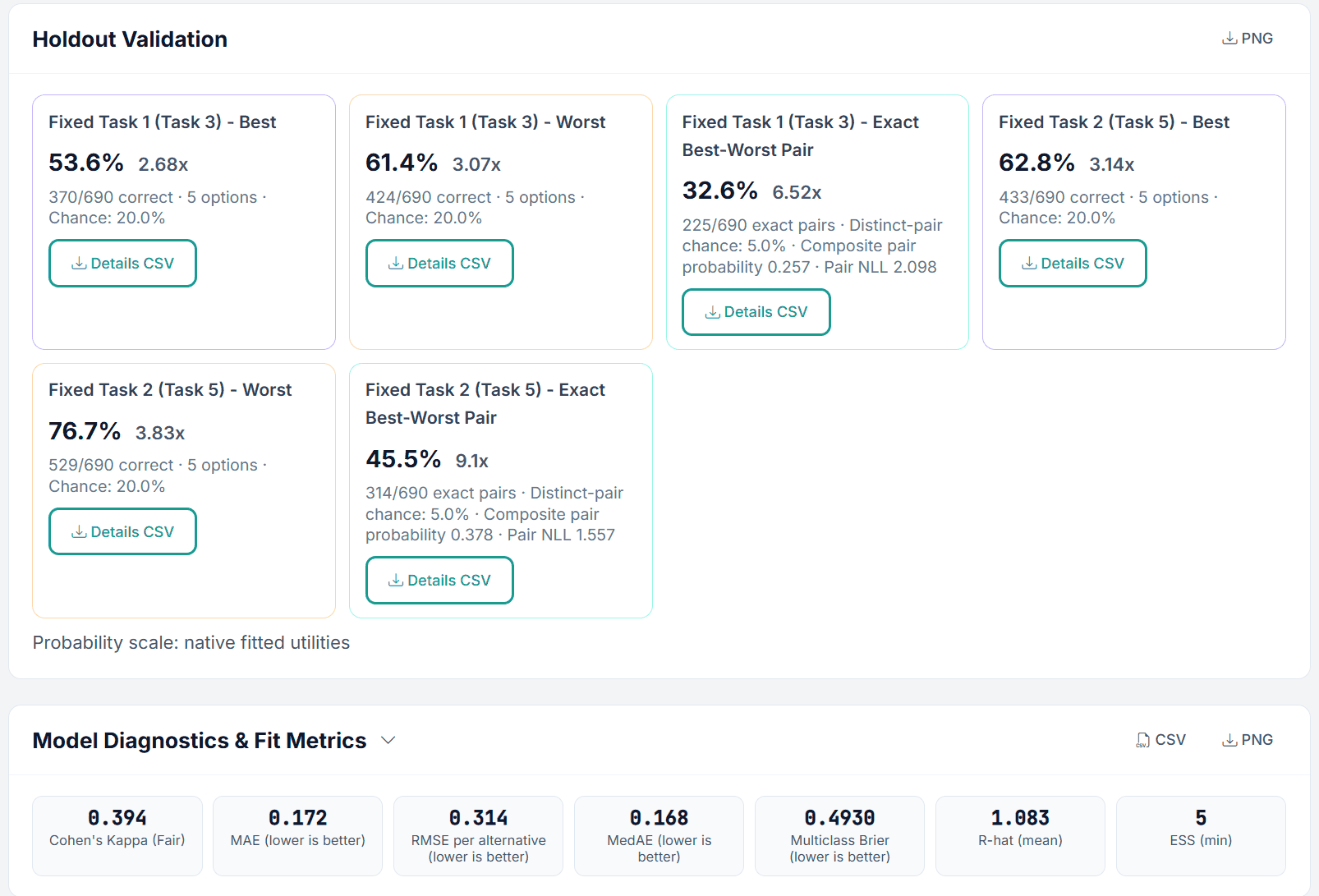
Figure 20. Holdout Validation and Model Diagnostics & Fit Metrics of the short demo run BWCBC_Run_1 (5,000 / 5,000). Each fixed task gets three cards: Best (fixed task 1: 370 of 690 correct, 53.6 percent, 2.68 times the 20 percent chance with 5 options), Worst, and Exact Best-Worst Pair (32.6 percent against a 5 percent chance for a distinct pair).
With best and worst answers the holdout check has three readings per fixed task. Best and Worst count a hit when the predicted most and least preferred concept match the answer; the chance level is 1 divided by the number of options. Exact Best-Worst Pair counts a hit only when both match; its chance level is 1 / (options × (options − 1)), 5 percent with five options. The number after each share (for example 2.68x) is the share divided by chance. The Model Diagnostics row below lists Cohen's Kappa, the error measures (MAE, RMSE per alternative, MedAE, Multiclass Brier) and R-hat (mean) and ESS (min) of the run; this demo run is too short to report (ESS 5).
Use three or four concepts so the worst choice resolves a real loser.
Keep profiles short; respondents read every card twice.
Use more than one fixed task as holdouts.
Keep the task name short (for example pizza), since bwcbc_ is added to every column.
Check the follow-up and the Two-Block flow in a survey test run; the editor Preview does not show them.
Do not
Do not assume the worst choice is free information; the evidence is mixed.
Do not forget the hidden button settings of the follow-up in Two-Block mode.
Do not read part-worths across attributes directly; use importances or the zero-centered-diff scale.
Do not ignore a low RLH; it usually means inattentive respondents or a confusing design.
Part II
Theoretical Background
Best-worst scaling, the negated-full-set best-worst choice model, and Hierarchical Bayes estimation.
11. Key Definitions
Attribute and level
An attribute is a feature that varies (Price (per pizza)); a level is one of its values (€11). A profile (concept) is one level per attribute.
Best-worst scaling (BWS)
A family of elicitation methods (Finn & Louviere, 1992) in which respondents choose the most and least preferred option in a set. Case 1 is single items (MaxDiff); Case 2 is attribute levels within one profile; Case 3 is full profiles.
Best-Worst CBC (Case 3)
The multi-profile case of BWS: several multi-attribute profiles are shown, and the respondent marks the best and the worst.
Best choice and worst choice
The profile with the highest utility in the set (best), and the profile with the lowest utility, equivalently the highest utility on the reversed scale (worst).
Part-worth utility
The contribution of a level to the overall attractiveness (utility) of a profile. Estimated per respondent.
Negated-full-set best-worst model
The model Choicery uses: best and worst are two logit choices over the same full set of alternatives, the worst one evaluated on the negated utility scale.
Hierarchical Bayes (HB)
An estimation method that models each respondent's utilities as drawn from a population distribution, so individual estimates borrow strength from the group.
RLH (root likelihood)
Geometric mean of the predicted probabilities of the choices actually made; a fit measure. In BW-CBC it covers the best and the worst observations together. Chance level is the geometric mean of one over the number of available alternatives per observation.
12. Best and Worst as Two Stacked Choices
BW-CBC rests on random utility theory (McFadden, 1974), the same foundation as ordinary CBC. Respondent h assigns to profile j a utility that is the sum of the part-worths of its levels plus a random error:
Uhj = Xj′ βh + εhj with Vhj = Xj′ βh
Utility of profile j for respondent h; Xj codes the levels, βh is the respondent's part-worths, Vhj is the systematic part.
What changes from plain CBC is that each task delivers two decisions rather than one. The best choice is the profile with maximum utility in the set, which under extreme-value errors gives the familiar multinomial logit over all J alternatives:
P(best = i | βh) = exp(Vhi) / Σj exp(Vhj)
Best choice: the standard logit over the full set of J profiles.
The worst choice is the profile with maximum utility on the negated scale, equivalently the minimum utility. Marley and Louviere (2005) formalise this as a logit on the reversed utilities. Choicery uses the negated-full-set form: the worst observation keeps the complete set of J alternatives and flips the sign of the systematic utility. The best alternative is not removed from the choice set.
P(worst = k | βh) = exp(−Vhk) / Σj exp(−Vhj)
Worst choice: a logit on the negated utilities over the same full set of J profiles.
The two decisions are stacked as independent observations for the same respondent, so the task contributes the product of the two probabilities to the likelihood:
Ltask(βh) = P(best = i | βh) × P(worst = k | βh)
Negated-full-set best-worst likelihood. Each task contributes one best observation and one worst observation, both over the full set.
The Choice Contributions setting in the estimation form selects which of these two terms is used: both (the default), the best term only, or the worst term only. If the design carries the follow-up on the option selected as Best and Include None Option is on, the follow-up enters as a logit over the full set of J products plus a None alternative. When the respondent answers Yes (would buy), this single observation replaces the product-only best observation: the best product is chosen from the J products and None. When the respondent answers No, the product-only best observation is kept and a further observation is added in which None is chosen from the J products and None. The worst observation is unchanged in both cases.
Why the negation?
Preferring a profile means high utility. Rejecting a profile as worst means low utility, which is the same as high utility once you flip the sign. Modelling the worst pick as a logit on the negated utilities lets a single set of part-worths explain both ends of the choice. The best pick pushes utilities up for the winner; the worst pick pushes them down for the loser. If respondents choose the worst less consistently than the best, the worst observations carry a smaller scale, which is the "scale damping" reported in the literature (Orme & Chrzan, 2017, ch. 18).
Best pick: choose max V over {1..J}.
Worst pick: choose max (-V) over the same {1..J}.
Each task -> two stacked logit observations for one respondent.
Choicery implements the negated-full-set variant of the Marley and Louviere (2005) best-worst logit: both stages use the full choice set, and the worst stage runs on the reversed utility scale. This is the same multinomial-logit machinery used by CBC, DR-CBC, and MaxDiff; only the construction and stacking of observations differ.
13. Hierarchical Bayes Estimation
Rather than estimate one average model (aggregate logit), HB estimates individual part-worths and a population distribution that ties them together (Lenk, DeSarbo, Green, & Young, 1996; Rossi, Allenby, & McCulloch, 2005). The model has two levels:
Individual part-worths are drawn from a population normal; the mean and covariance have diffuse priors.
Choicery draws from the posterior with a Gibbs sampler that alternates three steps per iteration: a Metropolis-Hastings update of each respondent's βh against the stacked best-worst likelihood (proposals shaped by the current covariance Σ), a Gibbs draw of the population mean μ, and a Gibbs draw of Σ from its Inverse-Wishart posterior. The only place best-worst enters is the likelihood in the first step: each respondent's contribution is the product of the best and worst sub-choice probabilities across their tasks.
Why HB instead of one aggregate model?
A single aggregate logit hides heterogeneity: if half the market is price-sensitive and half is not, the average looks moderately price-sensitive and describes nobody. HB recovers a price sensitivity for each person, which is what a realistic market simulation needs.
Aggregate logit: one β for everyone.
HB: one β_h per respondent, drawn from MVN(μ, Σ).
Best + worst per task -> two observations per task for each β_h.
Convergence diagnostics
R-hat below 1.05 (good) or 1.1 (acceptable) signals that independent chains agree. Effective sample size above 100 supports point estimates; above 400 is comfortable for intervals. If either is weak, use at least two chains, inspect the acceptance rate, and reallocate burn-in versus post-burn-in draws within the shared budget. Details: Preference Analysis (HB) guide.
Levels enter the model through effects coding. For an attribute with L levels, L minus 1 indicator columns are used and the last level is the negative sum of the others, so the part-worths of an attribute always sum to zero:
Effects coding. The reference level is the negative sum, so Σ utilities = 0 within the attribute.
Raw utilities are on the model's logit scale and their absolute size depends on response consistency, so they are not comparable across respondents or studies. Zero-centered diffs (ZC) rescale each respondent so that the average attribute range equals 100:
ZCi = Rawi × (100 / average attribute range)
Zero-centered-diff rescaling. After this, an attribute range of 100 is "average importance".
Importance of an attribute is its utility range divided by the sum of all ranges, expressed as a percentage:
Attribute importance. Computed per respondent, then averaged.
Because importances are computed per respondent and then averaged, they reflect that different people weight attributes differently. For a numeric attribute like Price you can instead mark it linear, which fits a single slope and feeds the willingness-to-pay and elasticity tools.
15. Experimental Design
A good BW-CBC design lets the logit separate the part-worths cleanly. Two properties matter: level balance (each level appears about equally often) and orthogonality (levels of different attributes are as uncorrelated as possible). Choicery generates designs with a balanced-overlap algorithm by default, which allows a controlled amount of level repetition within a task; D-Optimal and Random are the alternatives. Multiple versions (blocks) spread the full design across respondents.
Design is the same as CBC; the response is richer
BW-CBC uses the same class of choice design as ordinary CBC, and the design objective covers only the product profiles. What differs is downstream: every task yields a best and a worst observation. How much precision that buys in practice is an empirical question; the comparisons with best-only CBC are mixed (Section 2).
16. References
Finn, A., & Louviere, J. J. (1992). Determining the appropriate response to evidence of public concern: The case of food safety. Journal of Public Policy & Marketing, 11(2), 12-25.
Goeken, N., Kurz, P., & Steiner, W. J. (2024). Multimodal preference heterogeneity in choice-based conjoint analysis: A simulation study. Journal of Business Economics, 94, 137-185.
Hung, C.-Y., Liu, Y. M., Brazell, J. D., & Allenby, G. M. (2025). Dual response in conjoint analysis. Marketing Letters, 36(4), 857-873.
Lenk, P. J., DeSarbo, W. S., Green, P. E., & Young, M. R. (1996). Hierarchical Bayes conjoint analysis: Recovery of partworth heterogeneity from reduced experimental designs. Marketing Science, 15(2), 173-191.
Louviere, J. J., Flynn, T. N., & Marley, A. A. J. (2015). Best-worst scaling: Theory, methods and applications. Cambridge: Cambridge University Press.
Marley, A. A. J., & Louviere, J. J. (2005). Some probabilistic models of best, worst, and best-worst choices. Journal of Mathematical Psychology, 49(6), 464-480.
McFadden, D. (1974). Conditional logit analysis of qualitative choice behavior. In P. Zarembka (Ed.), Frontiers in econometrics (pp. 105-142). New York: Academic Press.
Orme, B. K. (2020). Getting started with conjoint analysis: Strategies for product design and pricing research (4th ed.). Manhattan Beach, CA: Research Publishers.
Orme, B. K., & Chrzan, K. (2017). Becoming an expert in conjoint analysis: Choice modeling for pros. Orem, UT: external conjoint software.
Rao, V. R. (2026). Applied conjoint analysis (2nd ed.). Springer. (Chapter 16 is written by B. Orme.)
Rossi, P. E., Allenby, G. M., & McCulloch, R. (2005). Bayesian statistics and marketing. Chichester: John Wiley & Sons.
Schramm, J. B., & Lichters, M. (2024). Incentive alignment in anchored MaxDiff yields superior predictive validity. Marketing Letters, 36(1), 1-16 (2025 issue).
Train, K. E. (2009). Discrete choice methods with simulation (2nd ed.). Cambridge: Cambridge University Press.